Kubernetes applications are made of more than data. To recover them you also need cluster state, configuration and the relationships between components.
What needs protecting
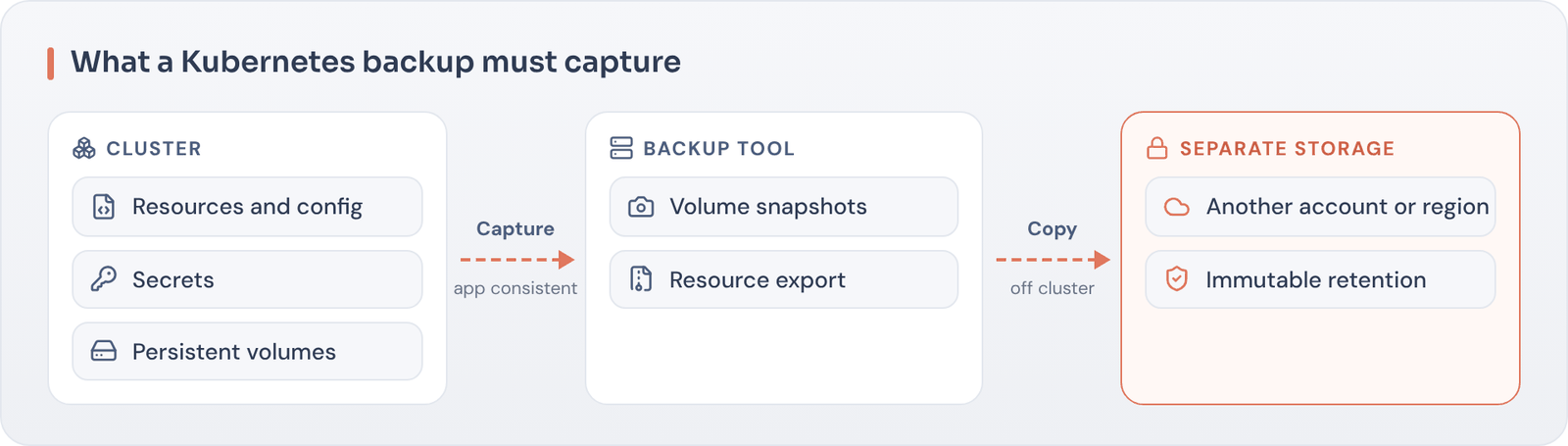
- Persistent volumes and databases
- Kubernetes resources: deployments, services, config maps, secrets
- Namespaces and custom resources
- Container images and registries
Approaches
Use Kubernetes-aware backup tools that capture application state consistently, and store copies outside the cluster with immutability. GitOps helps rebuild configuration but does not protect data.
Test recovery
Restore applications into a different cluster or namespace to prove recovery works, including secrets and dependencies.
Common pitfalls
- Backing up volumes without the Kubernetes resources needed to use them
- Storing backups in the same cluster or account as production
- Forgetting secrets, certificates and external dependencies
- Never testing restores into a different cluster
As containerized applications become business-critical, they need the same recovery discipline as virtual machines and databases, including immutability and isolation.
Key takeaways
- Protect data and Kubernetes state together.
- Store backups outside the cluster.
- Test restores into a separate cluster.
Want an independent view of your recoverability?
Book a Recovery Readiness Call and we’ll help you turn assumptions into evidence.