Ransomware gangs increasingly steal data as well as encrypting it. Encrypting your backups protects against theft, but poor key management can lock you out of your own data.
Encrypt at rest and in transit
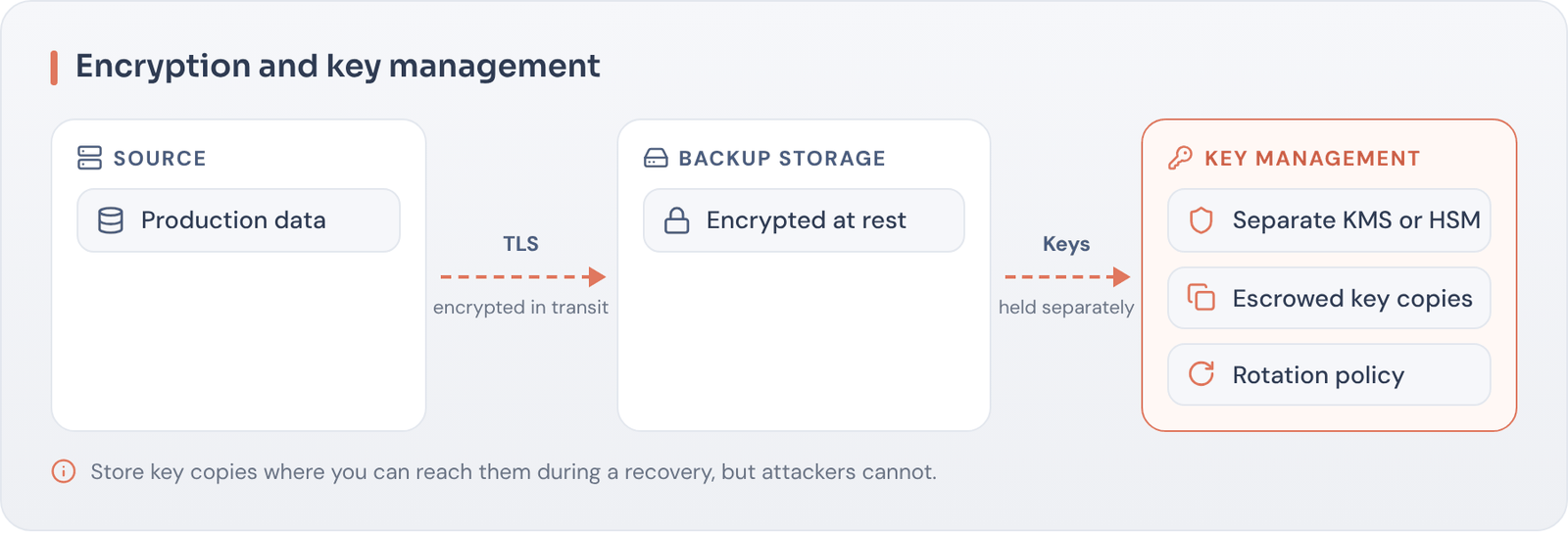
Backup data should be encrypted on disk, in the cloud and while moving between sites. Most modern platforms support this natively.
Key management
- Store keys separately from the backup data.
- Use a key management service or HSM where possible.
- Protect key access with MFA and separation of duties.
- Make sure keys are recoverable in a disaster, including in your clean room.
Why it matters If your keys are lost or held by an attacker, your encrypted backups become unusable.
Questions to ask your team
- Where are backup encryption keys stored, and who can access them?
- Could we recover the keys if our primary data center and identity systems were unavailable?
- Are keys rotated, and does rotation affect older backups?
- Is key access logged and monitored?
Key management is often designed by one team and forgotten. Including it in recovery tests is the best way to make sure it works when needed.
Key takeaways
- Encrypt backups at rest and in transit.
- Keep keys separate and protected.
- Plan key recovery as part of your DR design.
Want an independent view of your recoverability?
Book a Recovery Readiness Call and we’ll help you turn assumptions into evidence.