Microsoft Entra ID, formerly Azure Active Directory, controls who can sign in to Microsoft 365, Azure and most of your SaaS applications. If its configuration is deleted or changed by an attacker, everything that depends on it stops working.
What Microsoft provides
Deleted users, Microsoft 365 groups and some other objects go to a recycle bin and can be restored for a limited time. Many configuration items, such as changes to Conditional Access policies, group memberships or application settings, have no simple undo.
What to back up
- Users, groups and memberships
- Conditional Access and authentication policies
- App registrations, enterprise applications and their permissions
- Role assignments and administrative units
How to protect it
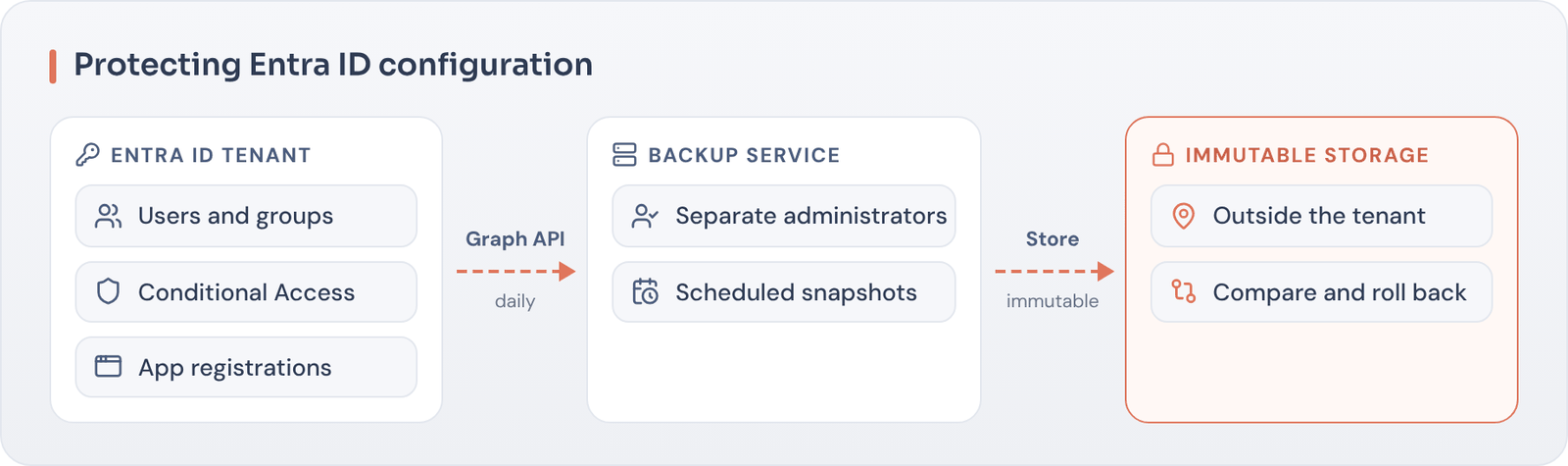
Use a backup tool that captures Entra ID configuration on a schedule and stores it outside your tenant with immutability. Make sure the backup service has its own administrators, so a compromised global admin cannot also delete the backups.
Key takeaways
- Entra ID is a dependency for nearly every cloud service.
- The recycle bin does not cover configuration changes.
- Back up configuration outside the tenant and test restores.
Could you roll back a bad identity change?
We review how your identity platform is protected and recovered.